

These users are your staff members, not tenants or tenant staff.
Access types
Administrators can access the panel in two ways.Roles
Setup → Role shows all available roles and the number of users assigned to each role.Create a role
Click Add Role and enter a Role Name, then select the required permissions.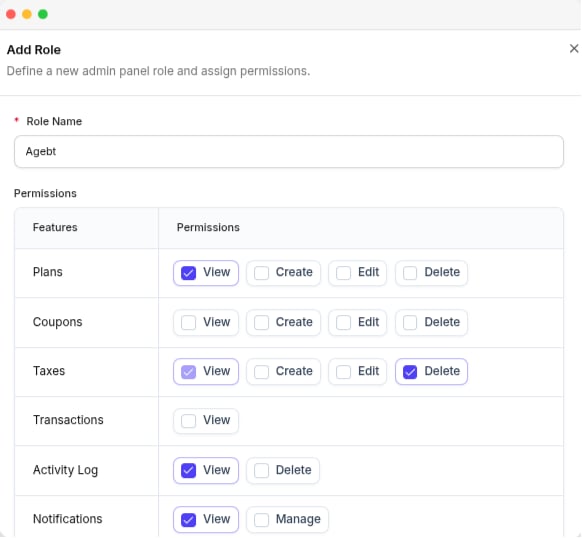
The Add Role panel, with the permission checkboxes for each area
Selecting Create, Edit, or Delete automatically gives the user View access to that area.
Delete a role
A role assigned to a user cannot be deleted. Move the users to another role first, then delete the unused role.Users
Setup → User shows all administrators with their name, phone, email, status, and added date.Add a user
Click Add User and enter the following details.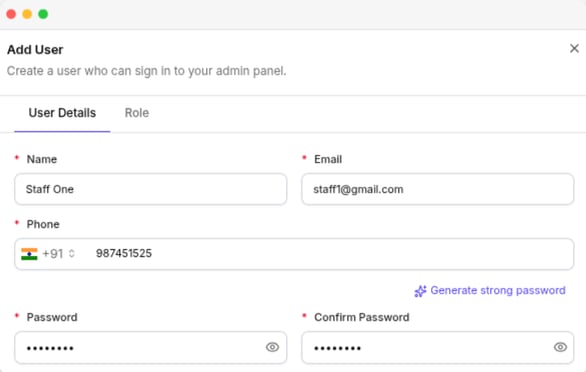
The Add User panel, with the User Details tab and the Role tab beside it
Edit a user
You can edit a user’s profile and access settings based on your permissions. The following rules apply:- You cannot change your own access settings.
- The account owner cannot be edited from this page. Update the owner’s details from Profile.
- Only a full-access administrator can manage users with Administrator Access.
You need full access to give someone full access. A staff member with a role cannot give it to anyone, including their own account.
Remove a user
You can remove staff users from the platform. These users cannot be removed:- Account owner
- Your own account