> ## Documentation Index
> Fetch the complete documentation index at: https://reseller-docs.wamatrix.io/llms.txt
> Use this file to discover all available pages before exploring further.
# Subscriptions
> View tenant subscriptions, plans, billing status, and renewal dates.
**Sales → Subscriptions** shows all tenant subscriptions. Each subscription appears as a separate row.
A subscription is created when you assign a plan to a tenant or when a tenant purchases a plan.
## Subscription details
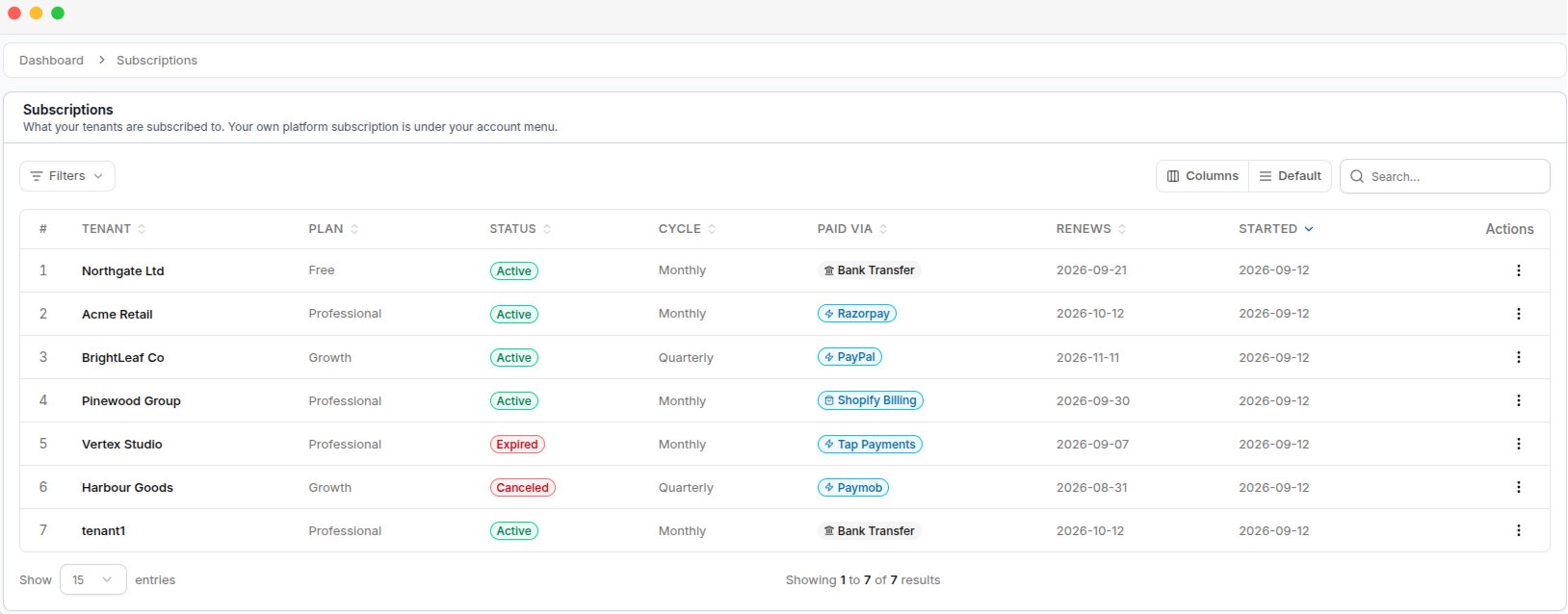 | Column | Description |
| ------------ | ---------------------------------------------------------------- |
| **Tenant** | Name of the tenant. Click the name to view subscription details. |
| **Plan** | Plan currently assigned to the tenant. |
| **Status** | Current subscription status. |
| **Cycle** | Billing period, such as monthly or yearly. |
| **Paid Via** | Payment method used for the subscription. |
| **Renews** | Date when the current billing period ends. |
| **Started** | Date when the subscription started. |
Click a column heading to sort the list.
## Subscription status
| Status | Description |
| ---------------- | ---------------------------------------------------------------------------------------------------- |
| **Trial** | Tenant is using the plan during the trial period. |
| **Active** | Subscription is active and the tenant has access to the plan. |
| **Billing Only** | Payment is overdue. The tenant can sign in and make the payment, but other features are unavailable. |
| **Suspended** | Payment has failed after the allowed attempts and tenant access is stopped. |
| **Expired** | The subscription period has ended and the plan was not renewed. |
### Subscription status flow
The status changes automatically based on the subscription and payment status.
When the subscription period ends, the tenant enters the **grace period** and keeps full access.
After the grace period ends, the status changes to **Billing Only**. The tenant can sign in and complete the pending payment.
If the billing period ends without payment, the subscription becomes **Expired**.
Tenants with **Billing Only** status can still sign in and complete their payment. Their full access is restored after the payment is successful.
You can configure the grace period and billing-only period under [**Settings → Subscription Lifecycle**](/pa/core-platform#grace-period-suspension).
If a tenant cancels their subscription, it remains **Active** until the current subscription period ends. Cancellation does not stop access immediately.
## View subscription details
Click a tenant's name to open the subscription details page.
| Column | Description |
| ------------ | ---------------------------------------------------------------- |
| **Tenant** | Name of the tenant. Click the name to view subscription details. |
| **Plan** | Plan currently assigned to the tenant. |
| **Status** | Current subscription status. |
| **Cycle** | Billing period, such as monthly or yearly. |
| **Paid Via** | Payment method used for the subscription. |
| **Renews** | Date when the current billing period ends. |
| **Started** | Date when the subscription started. |
Click a column heading to sort the list.
## Subscription status
| Status | Description |
| ---------------- | ---------------------------------------------------------------------------------------------------- |
| **Trial** | Tenant is using the plan during the trial period. |
| **Active** | Subscription is active and the tenant has access to the plan. |
| **Billing Only** | Payment is overdue. The tenant can sign in and make the payment, but other features are unavailable. |
| **Suspended** | Payment has failed after the allowed attempts and tenant access is stopped. |
| **Expired** | The subscription period has ended and the plan was not renewed. |
### Subscription status flow
The status changes automatically based on the subscription and payment status.
When the subscription period ends, the tenant enters the **grace period** and keeps full access.
After the grace period ends, the status changes to **Billing Only**. The tenant can sign in and complete the pending payment.
If the billing period ends without payment, the subscription becomes **Expired**.
Tenants with **Billing Only** status can still sign in and complete their payment. Their full access is restored after the payment is successful.
You can configure the grace period and billing-only period under [**Settings → Subscription Lifecycle**](/pa/core-platform#grace-period-suspension).
If a tenant cancels their subscription, it remains **Active** until the current subscription period ends. Cancellation does not stop access immediately.
## View subscription details
Click a tenant's name to open the subscription details page.
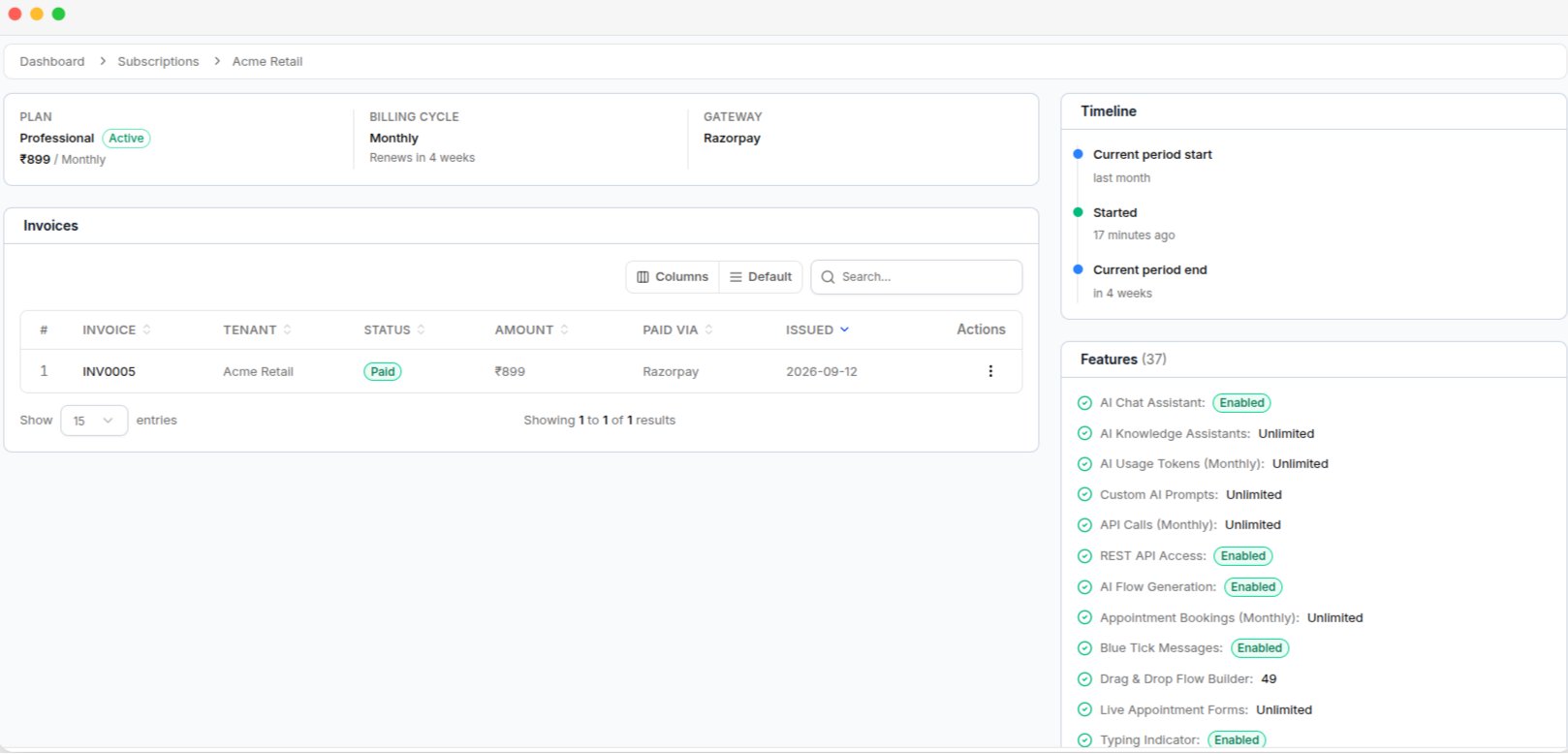 | Section | What it shows |
| ------------ | ------------------------------------------------------------------------------------------------------------ |
| **Plan** | Plan name, price, and billing period. |
| **Timeline** | Subscription events such as activation, renewal, plan changes, payment issues, cancellation, and expiration. |
| **Features** | Features and limits available with the tenant's plan. |
| **Invoices** | Invoices related to the subscription, which can be opened and downloaded as PDF. |
## Manage subscriptions
The Subscriptions page is mainly used to view subscription information. You cannot change the plan or renewal date from this page. The only row action is **Delete**.
**Delete permanently removes the subscription.** This action cannot be undone. Use it only when a subscription was created by mistake. Do not use Delete to cancel a tenant's subscription.
| Section | What it shows |
| ------------ | ------------------------------------------------------------------------------------------------------------ |
| **Plan** | Plan name, price, and billing period. |
| **Timeline** | Subscription events such as activation, renewal, plan changes, payment issues, cancellation, and expiration. |
| **Features** | Features and limits available with the tenant's plan. |
| **Invoices** | Invoices related to the subscription, which can be opened and downloaded as PDF. |
## Manage subscriptions
The Subscriptions page is mainly used to view subscription information. You cannot change the plan or renewal date from this page. The only row action is **Delete**.
**Delete permanently removes the subscription.** This action cannot be undone. Use it only when a subscription was created by mistake. Do not use Delete to cancel a tenant's subscription.