> ## Documentation Index
> Fetch the complete documentation index at: https://reseller-docs.wamatrix.io/llms.txt
> Use this file to discover all available pages before exploring further.
# Coupons
> Create discount codes tenants can use when they pay.
Coupons are discount codes that tenants can enter at checkout. Manage them from **Setup → Coupons**.
A coupon applies to a **particular payment only**. The tenant's next renewal is charged at the normal price.
## Create a coupon
Click **Add Coupon** to create a new coupon.
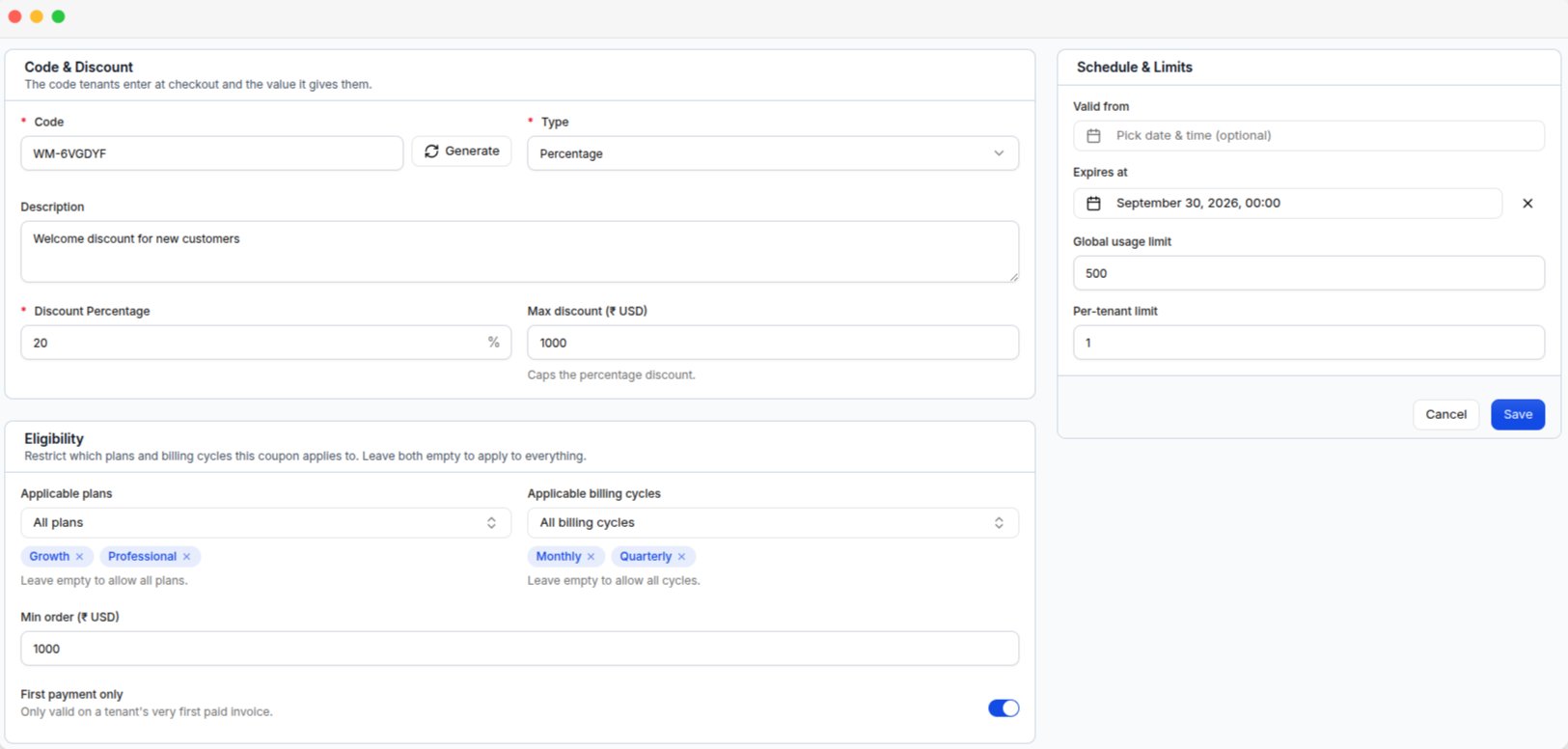 ### Coupon details
| Field | Description |
| --------------- | ------------------------------------------------------------------------------- |
| **Code** | Code the tenant enters at checkout. Click **Generate** to create a random code. |
| **Type** | Choose **Percentage** or **Fixed amount**. |
| **Description** | Internal note about the coupon. Tenants cannot see it. |
Coupon codes are stored in uppercase, so `save20` and `SAVE20` are treated as the same code.
### Discount
The fields depend on the selected **Type**.
| Field | Description |
| ----------------------- | --------------------------------- |
| **Discount Percentage** | Discount from 1% to 100%. |
| **Max discount** | Optional maximum discount amount. |
| Field | Description |
| ------------------- | ------------------------------------------------- |
| **Discount amount** | Fixed discount amount in the platform's currency. |
Coupon amounts use the platform's base currency configured under [Currency setup](/pa/currency-setup).
### Usage and validity
| Field | Description |
| ---------------------- | --------------------------------------------------------------------------- |
| **Applicable plans** | Restrict the coupon to selected plans. Leave empty for all plans. |
| **Billing cycles** | Restrict the coupon to selected billing cycles. Leave empty for all cycles. |
| **Min order** | Minimum order amount required to use the coupon. |
| **First payment only** | Allow the coupon only for tenants making their first payment. |
| **Valid from** | Date when the coupon becomes active. |
| **Expires at** | Date when the coupon expires. |
| **Global usage limit** | Maximum number of times the coupon can be used by all tenants. |
| **Per-tenant limit** | Maximum number of times one tenant can use the coupon. |
Leaving a limit empty means there is no limit.
Enable **First payment only** if the coupon is intended for new tenants.
## Manage coupons
### Coupon details
| Field | Description |
| --------------- | ------------------------------------------------------------------------------- |
| **Code** | Code the tenant enters at checkout. Click **Generate** to create a random code. |
| **Type** | Choose **Percentage** or **Fixed amount**. |
| **Description** | Internal note about the coupon. Tenants cannot see it. |
Coupon codes are stored in uppercase, so `save20` and `SAVE20` are treated as the same code.
### Discount
The fields depend on the selected **Type**.
| Field | Description |
| ----------------------- | --------------------------------- |
| **Discount Percentage** | Discount from 1% to 100%. |
| **Max discount** | Optional maximum discount amount. |
| Field | Description |
| ------------------- | ------------------------------------------------- |
| **Discount amount** | Fixed discount amount in the platform's currency. |
Coupon amounts use the platform's base currency configured under [Currency setup](/pa/currency-setup).
### Usage and validity
| Field | Description |
| ---------------------- | --------------------------------------------------------------------------- |
| **Applicable plans** | Restrict the coupon to selected plans. Leave empty for all plans. |
| **Billing cycles** | Restrict the coupon to selected billing cycles. Leave empty for all cycles. |
| **Min order** | Minimum order amount required to use the coupon. |
| **First payment only** | Allow the coupon only for tenants making their first payment. |
| **Valid from** | Date when the coupon becomes active. |
| **Expires at** | Date when the coupon expires. |
| **Global usage limit** | Maximum number of times the coupon can be used by all tenants. |
| **Per-tenant limit** | Maximum number of times one tenant can use the coupon. |
Leaving a limit empty means there is no limit.
Enable **First payment only** if the coupon is intended for new tenants.
## Manage coupons
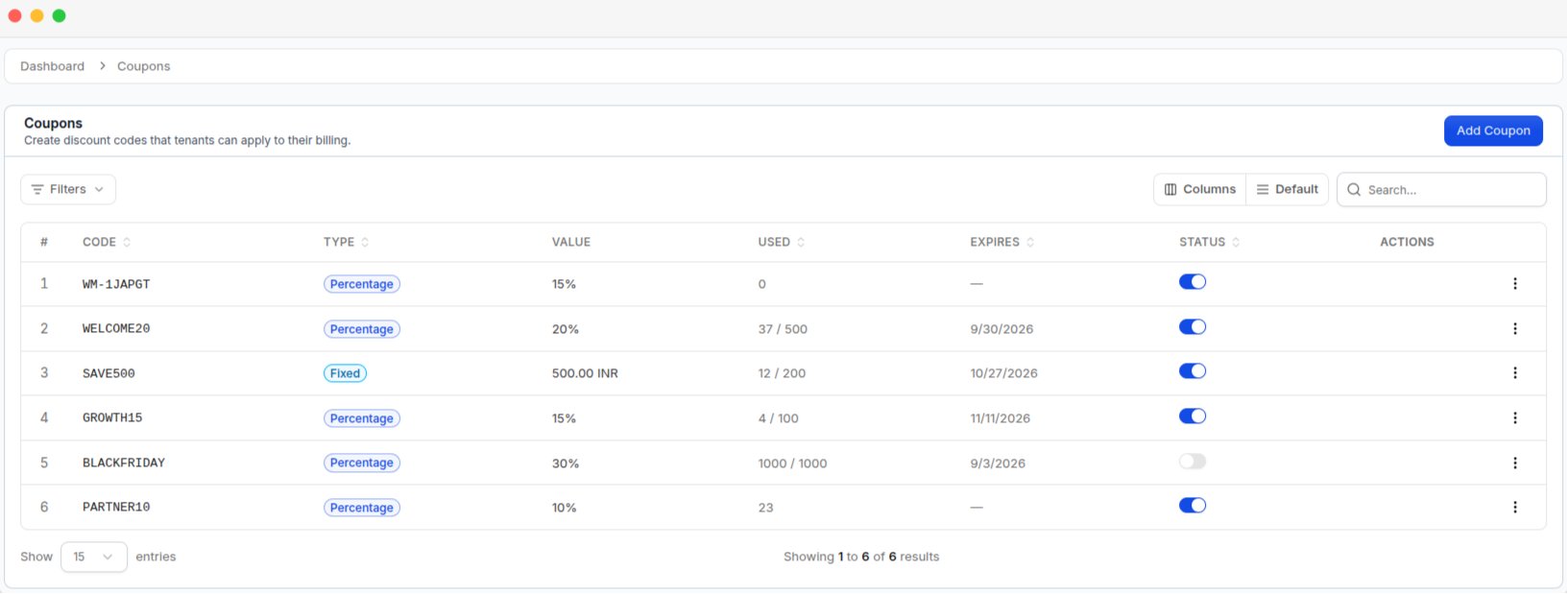 The coupon list shows the **Code**, **Type**, **Value**, **Used**, **Expires**, and **Status** of each coupon. You can filter coupons by **Status**, **Type**, and **Expired**.
The **Status** switch allows you to disable a coupon without deleting it.
| Action | What it does |
| ---------- | -------------------------------------------------------- |
| **Edit** | Change the coupon details. |
| **Usage** | View the tenant, discount, status, and date of each use. |
| **Delete** | Delete the coupon. |
Deleting a coupon does not remove discounts from existing invoices. To stop a coupon from being used, disable its **Status** instead.
## How tenants use coupons
Tenants enter the coupon code at checkout when they:
* Activate a subscription
* Renew a subscription
* Upgrade a subscription
Coupons can be used with both online payments and bank transfers. The discount is applied before tax is calculated.
The coupon list shows the **Code**, **Type**, **Value**, **Used**, **Expires**, and **Status** of each coupon. You can filter coupons by **Status**, **Type**, and **Expired**.
The **Status** switch allows you to disable a coupon without deleting it.
| Action | What it does |
| ---------- | -------------------------------------------------------- |
| **Edit** | Change the coupon details. |
| **Usage** | View the tenant, discount, status, and date of each use. |
| **Delete** | Delete the coupon. |
Deleting a coupon does not remove discounts from existing invoices. To stop a coupon from being used, disable its **Status** instead.
## How tenants use coupons
Tenants enter the coupon code at checkout when they:
* Activate a subscription
* Renew a subscription
* Upgrade a subscription
Coupons can be used with both online payments and bank transfers. The discount is applied before tax is calculated.