> ## Documentation Index
> Fetch the complete documentation index at: https://reseller-docs.wamatrix.io/llms.txt
> Use this file to discover all available pages before exploring further.
# Generations
> Review AI-generated flows and their token usage.
**AI Flow → Generations** shows the flows generated by AI for your tenants.
You can review what the tenant requested, the generated flow, generation status, and token usage.
## Generation list
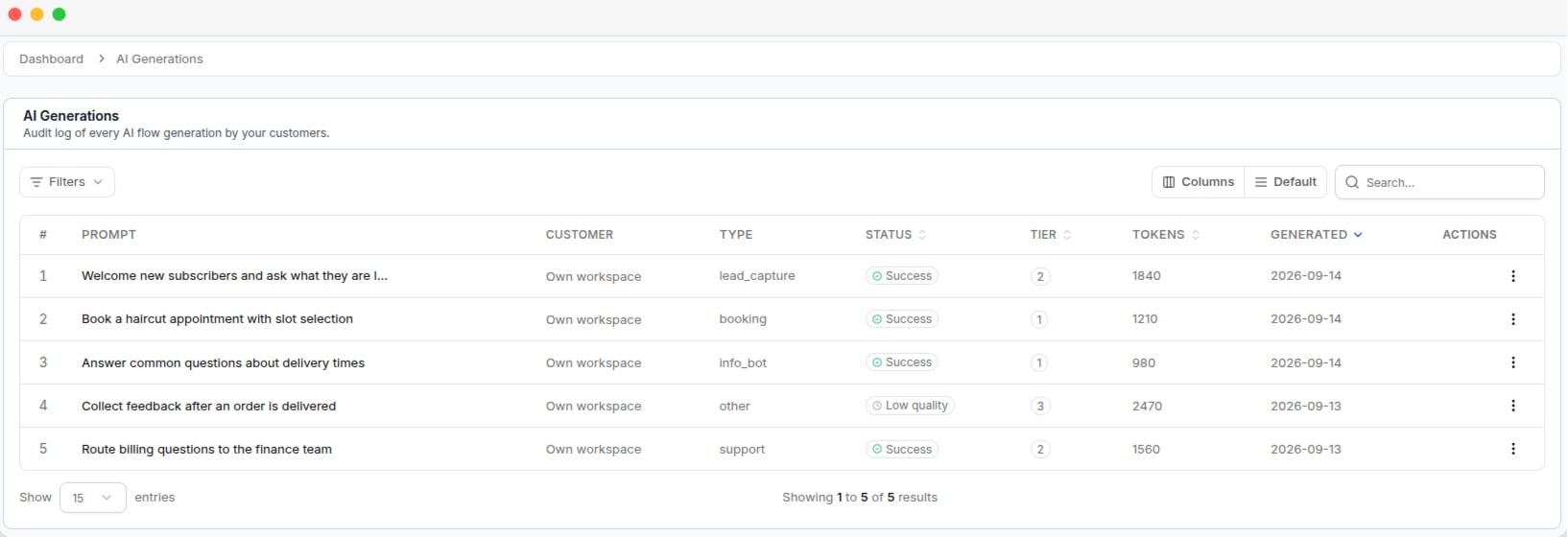 | Column | Description |
| ------------- | -------------------------------------------------------------- |
| **Prompt** | Request submitted by the tenant. |
| **Customer** | Tenant who requested the flow. Empty for internal generations. |
| **Type** | Type of flow requested. |
| **Status** | Result of the generation. |
| **Tier** | Generation method used by the AI. |
| **Tokens** | Tokens used during generation. |
| **Generated** | Date and time of the generation. |
You can filter generations by **Status** and **Type**.
## Generation status
| Status | Meaning |
| --------------- | ------------------------------------------------------------------------------------------------ |
| **Success** | The generated flow passed the quality check. |
| **Low quality** | A flow was generated but did not meet the quality threshold. The tenant still received the flow. |
**Low quality** does not mean that no flow was generated. It means the generated flow received a low quality score.
The **Status** filter also includes **Failed** and **Pending**, but these statuses are not recorded as completed generations. They normally return no results.
## Generation tiers
The tier shows how the AI generated the flow.
| Tier | Description |
| ------------- | --------------------------------------------------------------- |
| **Single** | The flow was generated once and passed the quality check. |
| **Repaired** | The first attempt was close to acceptable and was corrected. |
| **Best of N** | Multiple flows were generated and the best result was selected. |
Higher tiers use more tokens. **Best of N** can use several times more tokens than a **Single** generation.
## View a generation
Click a generation to view the full **Prompt** submitted to the AI, the generated **Flow**, and the generation details and token usage.
You can delete a generation from the list.
Deleting a generation only removes the generation record. The flow already created for the tenant is not affected.
| Column | Description |
| ------------- | -------------------------------------------------------------- |
| **Prompt** | Request submitted by the tenant. |
| **Customer** | Tenant who requested the flow. Empty for internal generations. |
| **Type** | Type of flow requested. |
| **Status** | Result of the generation. |
| **Tier** | Generation method used by the AI. |
| **Tokens** | Tokens used during generation. |
| **Generated** | Date and time of the generation. |
You can filter generations by **Status** and **Type**.
## Generation status
| Status | Meaning |
| --------------- | ------------------------------------------------------------------------------------------------ |
| **Success** | The generated flow passed the quality check. |
| **Low quality** | A flow was generated but did not meet the quality threshold. The tenant still received the flow. |
**Low quality** does not mean that no flow was generated. It means the generated flow received a low quality score.
The **Status** filter also includes **Failed** and **Pending**, but these statuses are not recorded as completed generations. They normally return no results.
## Generation tiers
The tier shows how the AI generated the flow.
| Tier | Description |
| ------------- | --------------------------------------------------------------- |
| **Single** | The flow was generated once and passed the quality check. |
| **Repaired** | The first attempt was close to acceptable and was corrected. |
| **Best of N** | Multiple flows were generated and the best result was selected. |
Higher tiers use more tokens. **Best of N** can use several times more tokens than a **Single** generation.
## View a generation
Click a generation to view the full **Prompt** submitted to the AI, the generated **Flow**, and the generation details and token usage.
You can delete a generation from the list.
Deleting a generation only removes the generation record. The flow already created for the tenant is not affected.